▸ contents
Note: This case study is based on real work completed at Amazon. Specific internal systems have been generalized or omitted to respect confidentiality.
At Amazon’s scale, translation is infrastructure. Thousands of product pages, help articles, and system messages get updated weekly across dozens of languages. Machine translation enabled that scale. It also raised the stakes for quality assurance in ways the organization wasn’t fully equipped to handle.
QA reviewers were logging translation errors in spreadsheets, disconnected from the tools they actually used to review and edit. Scoring was slow, manual, and inconsistent. That was a problem for linguists trying to meet deadlines, and a worse problem for ML teams trying to use quality signals as training data.
We needed to measure quality in a way that helped linguists work faster now and produced better training signals later.
The problem was cognitive, not mechanical
User interviews and observations showed how freelance linguists juggled fragmented workflows under tight deadlines. The spreadsheet wasn't the real friction. The context switch was. They were editing short segments of text, then switching tools to log errors, which added friction, introduced mistakes, and made the scoring data less reliable precisely when it needed to be most accurate.
We narrowed their core needs to three: understand the requirements so they could focus on the error types that actually mattered, log issues quickly after making edits, and review their work before submitting a final score.
After confirming these patterns with internal program managers, we saw the downstream effects: missed deadlines, inconsistent quality bars, reviewer churn. Scoring accuracy depended on reducing friction. A reviewer wrestling with a bad interface logs worse data.
The scoring panel
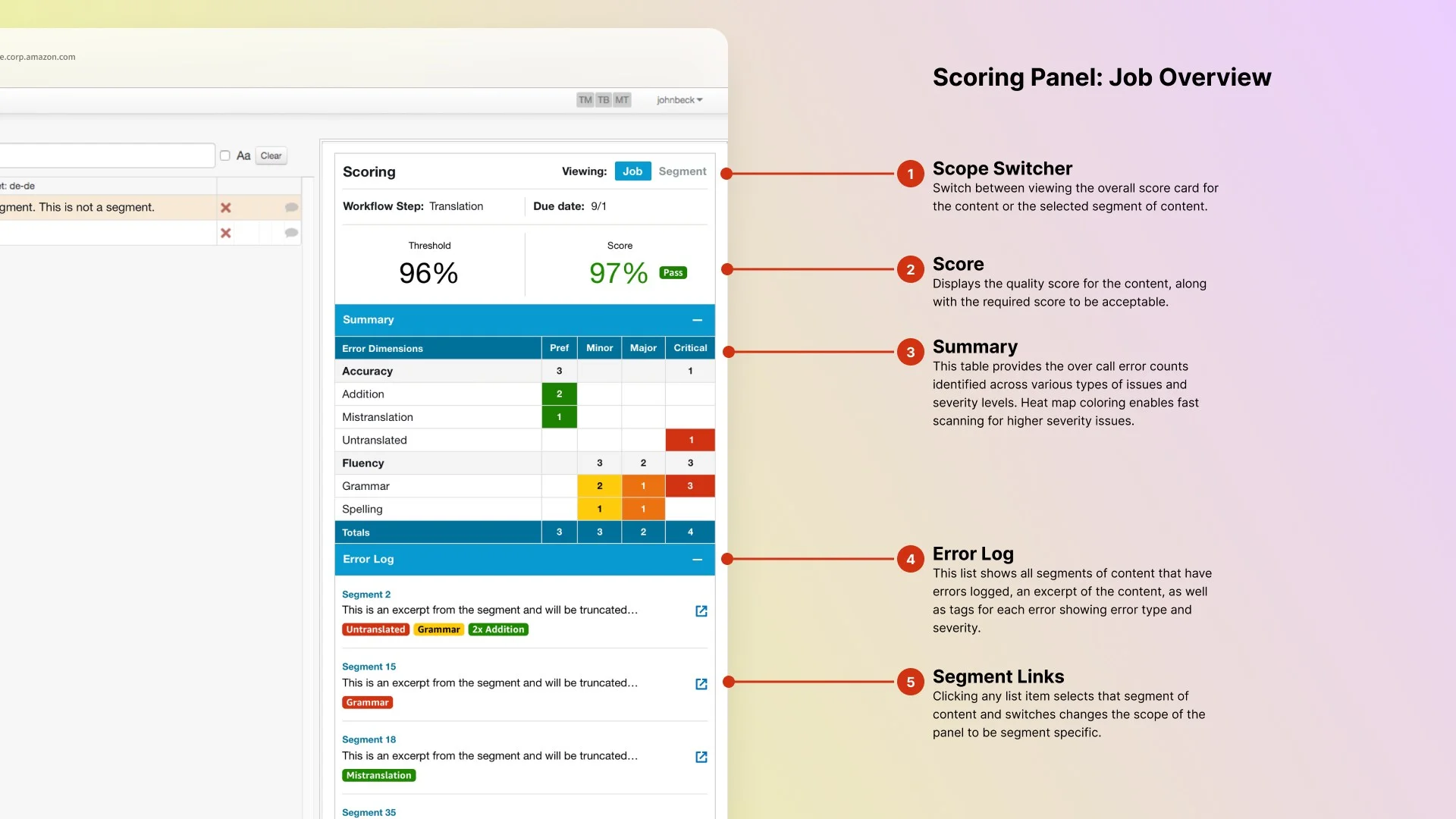
I designed a scoring panel to embed directly in the translation tool Embedding scoring in the existing tool was a deliberate scope choice. Reviewers were already there. Keeping scoring grounded to that context meant the data quality would follow. , so linguists could log errors while editing without switching contexts. The panel had two main views: the job-level scorecard and the segment-level error detail.
The scorecard showed which error types counted for a given job and why, with definitions visible rather than buried in documentation. This gave reviewers the guidance they needed to score accurately, and gave quality managers a clear audit trail. An error log below surfaced every flagged segment with type and severity badges, with click-through to the segment detail.
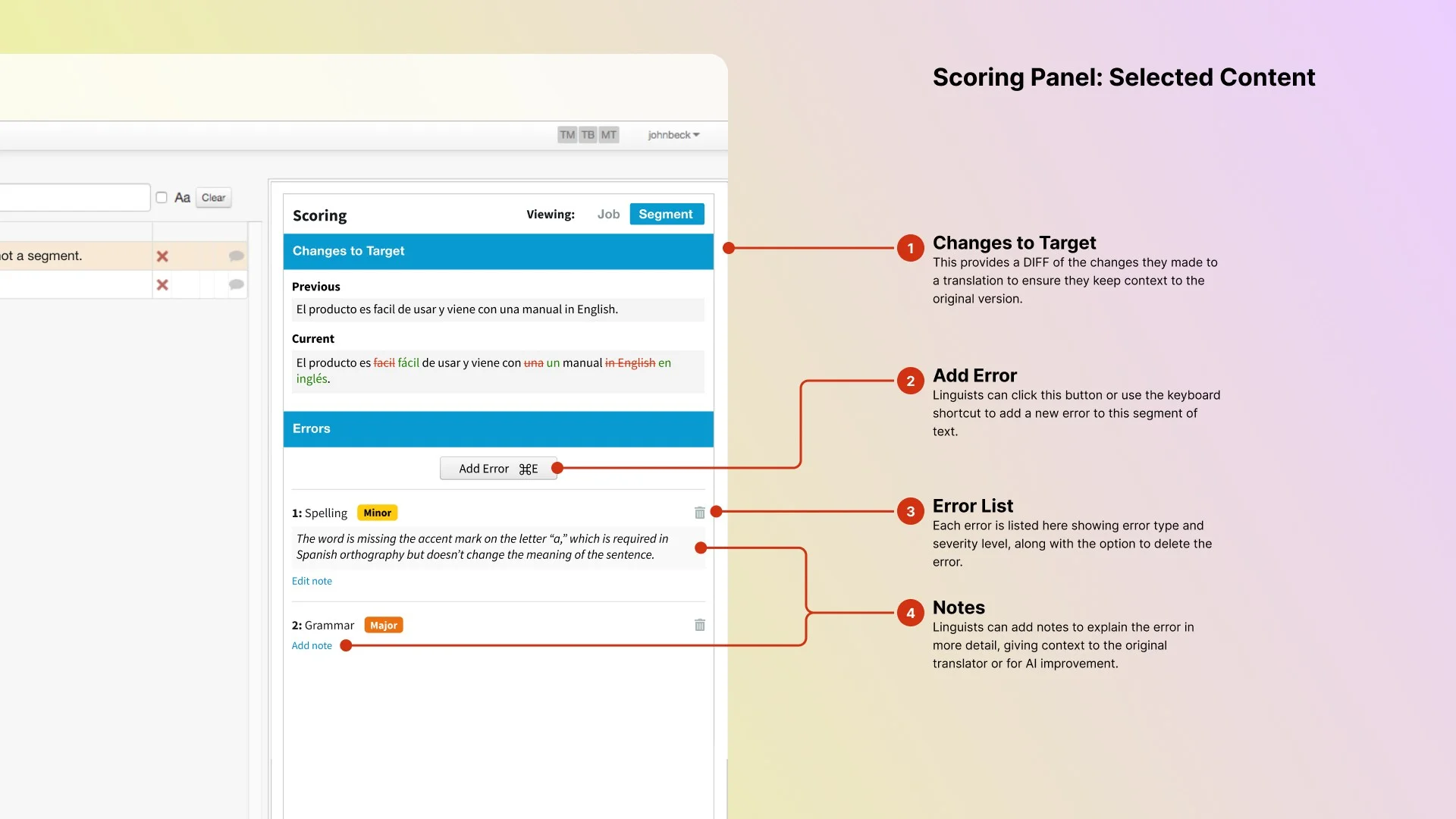
When making revisions, the segment view showed a diff between original and revised text, so reviewers could confirm what changed without re-reading the whole segment. Each segment had its own error list, supporting multiple issues of varying severity in any given text unit.
Finding the right level of simplicity
Our first instinct was to make the scorecard itself the input: click a cell in the type/severity matrix to log an error. Clean, fast, minimal UI chrome.
Reviewers consistently told us the same thing: reducing clicks wasn’t the problem. Cognitive load was. Scanning rows and columns while also reading a translated segment was exactly the kind of dual-task overhead that made scoring inaccurate.
So I designed a new component from scratch. It blended the familiarity of a dropdown with the structure of a progress stepper. A focused three-step flow: choose error type (with short-code support), choose severity on a 0-3 scale, add optional notes. Compact and recoverable. Users could navigate by mouse or keyboard and step back to fix mistakes without starting over.
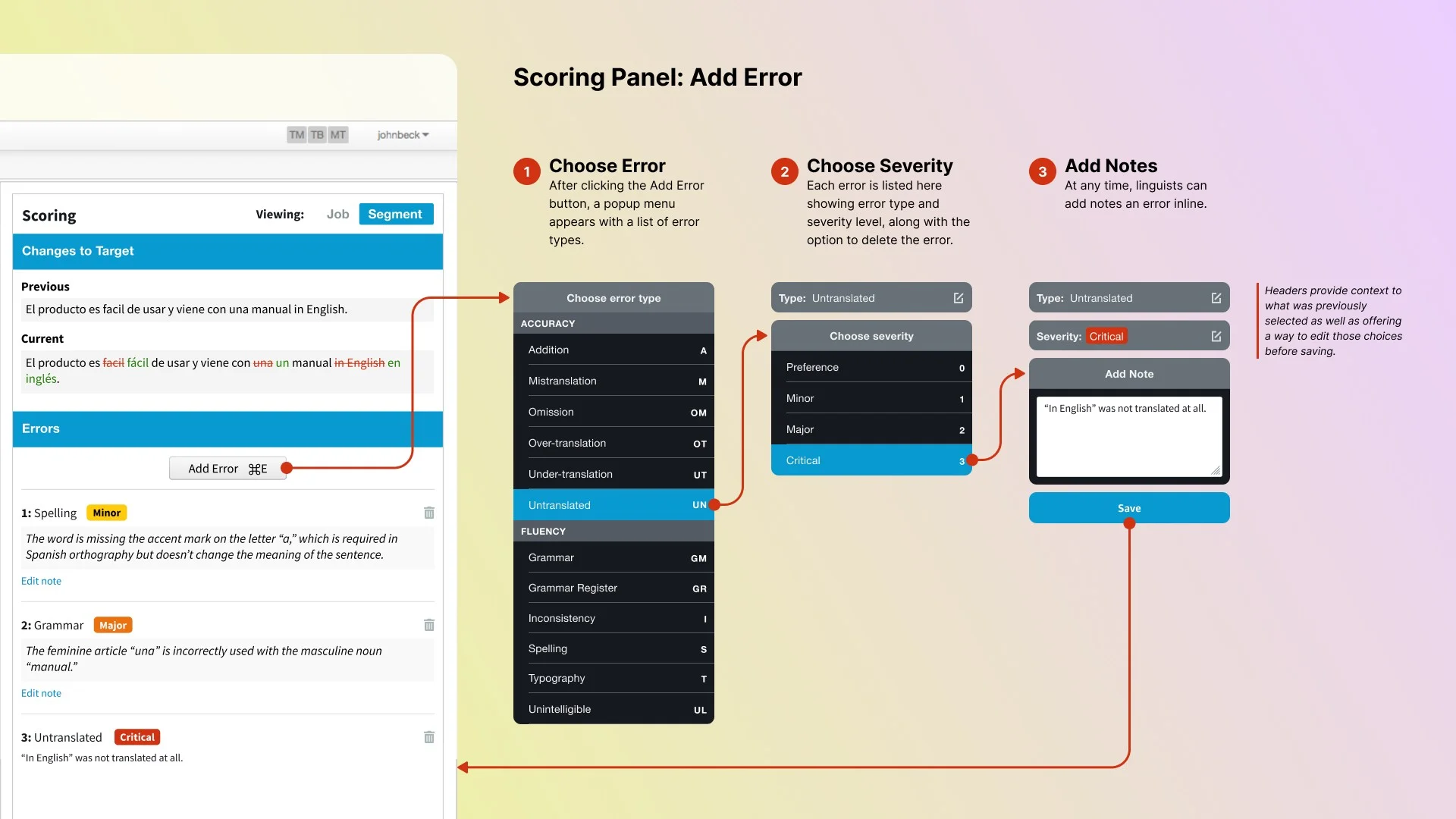
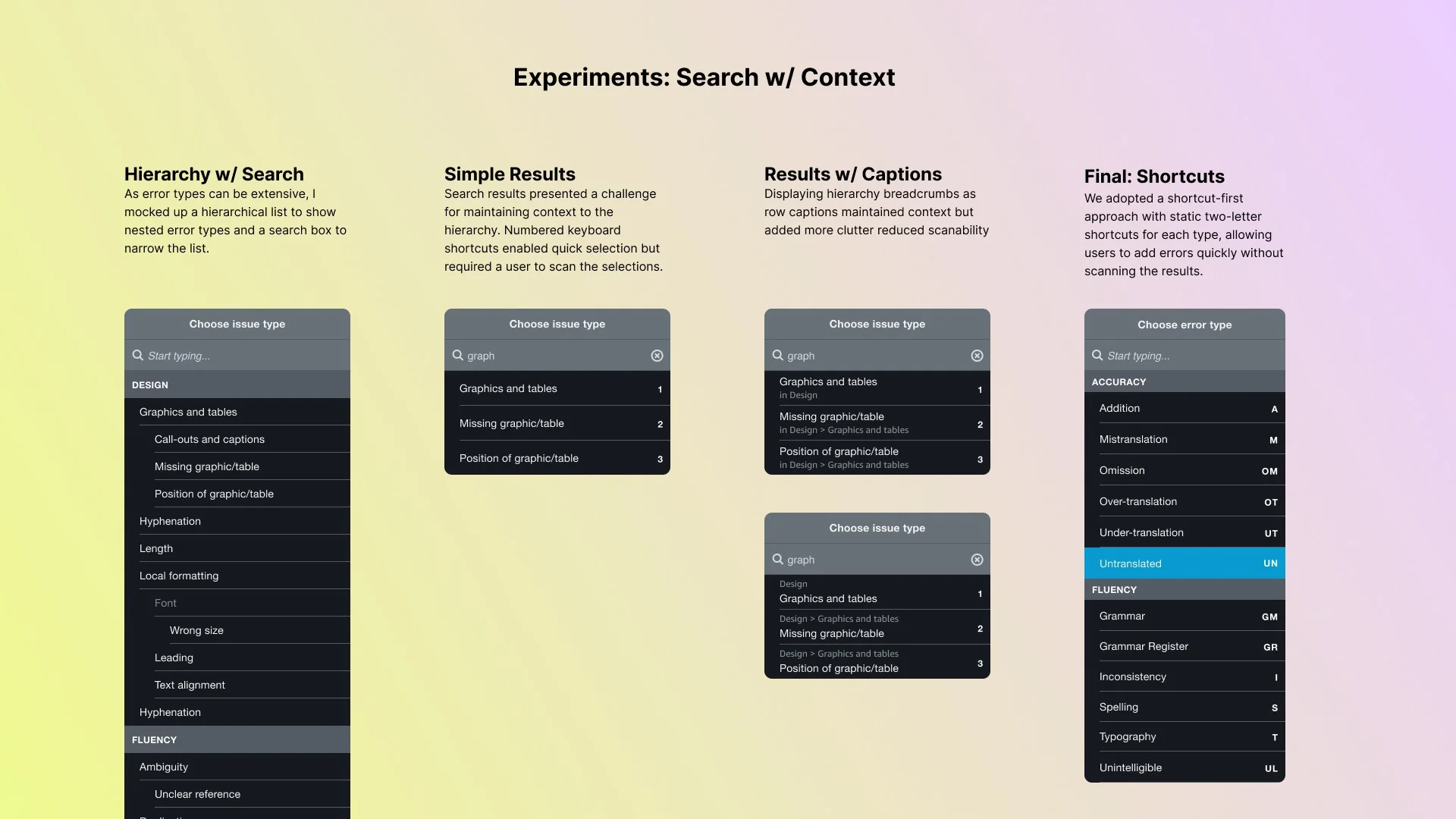
I pushed for keyboard navigation from day one. Keyboard-first wasn't a nice-to-have. Linguists run on shortcuts throughout the CAT tool. It was designing for where their hands already were. Errors could be triggered with a shortcut, typed using two-letter codes for error types, and confirmed with number keys. Linguists were already running on shortcuts throughout the CAT tool. Logging errors this way meant they never had to reach for the mouse.
Validated with the people doing the work
We validated designs with a rotating group of 40 freelance linguists 40 freelancers across multiple validation rounds is a meaningful sample for enterprise internal tooling. Not one hallway session. : clickable mockups, a prototype, and a final usability review before launch. Each session had them walk through a real scoring job to observe how they moved between views, how they used keyboard versus mouse, and how they made sense of the error log.
Key findings: the navigation model was intuitive, severity color coding helped with triage once it clicked in context, and diff views were immediately understood as high-value. Participants wanted them before we’d launched. The consistent request was better filtering in the error log, so reviewers could spot patterns before submitting.
Outcomes
The tool reduced time-to-score from roughly 30 minutes per 100 segments to under 5 minutes in the integrated panel. Spreadsheet-based logging was gone entirely. It supported multiple scoring models for different customers and gave quality managers a reliable audit trail for the first time.
More consequentially: routing more volume through freelance reviewers instead of third-party vendors saved $12.5 million per year. The scoring tool made that shift possible. It built enough confidence in freelance QA that volume could follow.
And the labeled error data it generated became training infrastructure. Every error logged had type, severity, and reviewer rationale attached. That’s exactly the kind of signal ML teams need for model evaluation and supervised learning. The interface made it possible to collect that reliably at scale.
Reflection
Quality at scale doesn’t come from automation alone. It depends on the humans in the loop doing good work, which means the tools around them have to be low-friction.
Logging translation errors might seem like an invisible task. For the people doing it, it’s front and center. The friction is real. The cognitive load compounds over a long session. And the accuracy of their judgment is exactly what downstream systems depend on.
By embedding scoring directly in the review flow, we made a high-effort task feel purposeful. We reduced friction, respected reviewers’ time, and captured structured data without disrupting their work. The ML teams got cleaner signals. The operations team got a path to cost savings. And linguists got a tool that didn’t fight them.